A process manager in Rust that supervises anything you can run, starts in a hundred milliseconds and keeps its daemon under 11 MB, even with a hundred processes.
- Role
- Author and maintainer
- Since
- February 2026
- Language
- Rust, with a TypeScript web dashboard
- License
- MIT
PM2 is the default answer for keeping services alive, but it is a Node.js tool at heart and its daemon runs on Node.js. OxMgr keeps the workflow and drops the runtime: the same commands for a Node API, a Python worker, a Go binary or a shell script, a much smaller daemon, and config files you can apply again and again without surprises.
- Language-agnostic: manage any executable, not just Node.js apps
- Cross-platform: Linux, macOS and Windows
- A small Rust daemon with persistent local state
- Restart policies, health checks, file watching, log rotation and CPU and RAM metrics
- Config-first: an idempotent oxmgr apply, plus PM2 ecosystem files as they are
- oxmgr runtime, a foreground mode for Docker and Kubernetes
- A terminal UI with live search, filters and sorting, and a web dashboard
oxmgr start "node server.js" --name api --restart always
oxmgr list
oxmgr logs api -f
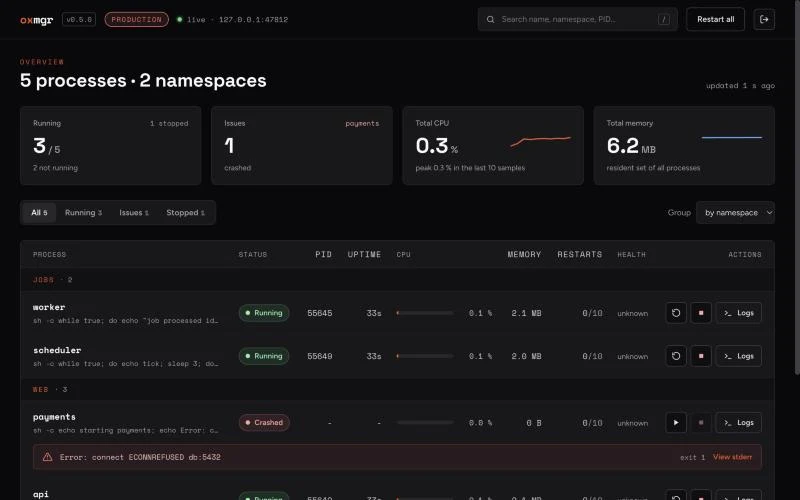
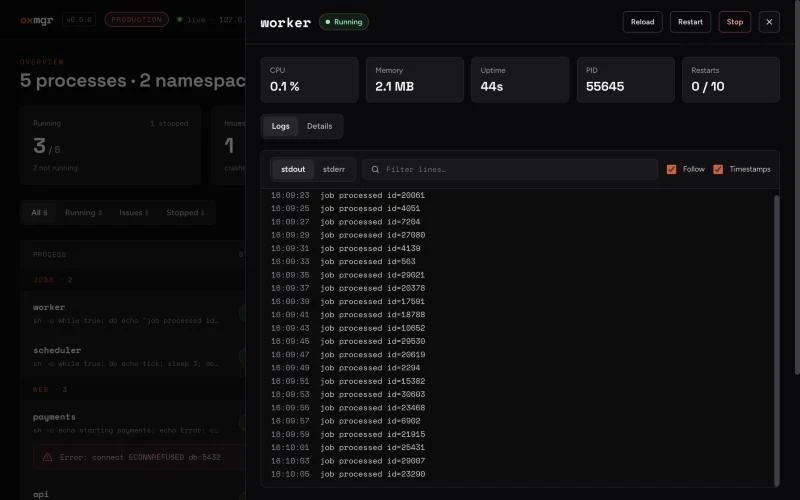
oxmgr uiThe same daemon has two faces. oxmgr ui is a terminal UI with live search, status filters and sorting by CPU, memory or restarts. The daemon can also serve a web dashboard, rebuilt in October 2026 in React and TypeScript with sign-in and an authenticated WebSocket: every process grouped by namespace with its CPU, memory, restarts and health, a crash explained right under the process, and live logs one click away.
An automated GitHub Actions workflow benchmarks OxMgr against PM2 and commits the result to the repository. Shared runners are noisy, so these are trends rather than lab results, but the trend is clear.
Empty daemon boot
Empty daemon memory
Daemon memory, 100 processes
Crash until the new PID is visible
Crash until TCP is ready again
A tool like this is only useful if it is one command away, so every release goes out through five channels: npm, a Homebrew tap, a Scoop bucket, the AUR and a signed APT repository. Services install themselves into systemd, launchd or the Windows Task Scheduler.
npm install -g oxmgr
brew tap empellio/homebrew-tap && brew install oxmgr
scoop install oxmgr/oxmgr
yay -S oxmgr-bin
sudo apt install oxmgr- releases, from v0.0.1 in February to v0.6.0 in October 2026
- 27
- commits
- 283
- package managers
- 5
Star count and source are live on GitHub.